Integrating Kawaii Crafts into Professional Design Workflows
In the modern digital landscape, visual appeal is no longer a secondary consideration; it is a primary driver of engagement. For creators, entrepreneurs, and marketers, the ability to quickly deploy high-quality, emotionally resonant graphics can significantly impact project outcomes. This is where specialized asset libraries like Kawaii Crafts become essential tools in a professional’s toolkit. Rather than viewing these assets merely as decorative elements, successful users integrate them strategically into broader design processes, ensuring consistency, efficiency, and brand alignment.
The term "kawaii," originating from Japanese culture, denotes cuteness, charm, and approachability. In a business or creative context, leveraging this aesthetic can soften corporate messaging, enhance educational materials, or add personality to consumer products. However, the true value lies not just in the style, but in the technical readiness of the assets. A well-structured digital package allows for seamless integration into existing workflows, reducing the friction between concept and execution.
Understanding the Asset Structure and Technical Specifications
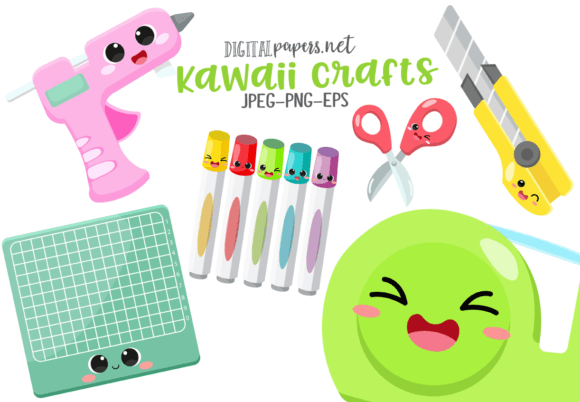
Before implementing any new resource into your workflow, it is critical to understand what you are receiving and how it interacts with your current software ecosystem. The Kawaii Crafts package is designed with versatility in mind, catering to both raster-based and vector-based workflows. Understanding the specific file types provided ensures that you select the right format for the right task, optimizing both quality and performance.
The package includes three distinct formats, each serving a specific purpose in the design pipeline:
- PNG Files (Transparent Background): The inclusion of six high-resolution PNG images at 300 DPI with transparent backgrounds is ideal for digital compositions. These files allow you to layer graphics over photographs, colored backgrounds, or complex layouts without the need for manual background removal. This saves significant time during the editing phase and ensures clean edges around the illustrations.
- JPEG Files (White Background): The corresponding six JPEG images, also at 300 DPI but with white backgrounds, are suited for specific print applications or quick previews where transparency is not required. Having both versions available provides flexibility depending on the final output medium.
- EPS Vector File: Perhaps the most valuable component for professional scalability is the single EPS vector file, saved in Adobe Illustrator CC version. Vector graphics are resolution-independent, meaning they can be scaled to any size—from a small icon on a website to a large banner for a trade show—without losing clarity. This format is essential for maintaining brand consistency across various media sizes.
By providing these multiple formats, the asset pack acknowledges the diverse needs of modern creators. Whether you are a blogger needing quick web graphics or a product designer creating large-scale prints, the technical specifications support a wide range of use cases without requiring additional conversion steps.
Strategic Placement in the Creative Process
Effective use of Kawaii Crafts requires planning. Integrating these assets should not be an afterthought but a deliberate part of the project lifecycle. Here is how these resources fit into different stages of a typical creative or business workflow.
Pre-Production and Planning
During the conceptual phase, designers and marketers often create mood boards or style guides. Introducing kawaii elements at this stage helps establish the emotional tone of the project. If the goal is to create approachable, friendly, or youthful branding, selecting specific images from the Kawaii Crafts library early on ensures that subsequent design decisions align with this aesthetic. This prevents costly revisions later in the process when the visual direction is already set.
Furthermore, assessing the compatibility of these assets with your brand colors and typography during planning ensures cohesion. Since the EPS file is editable in Adobe Illustrator, you can test color variations against your brand palette before finalizing designs. This proactive approach minimizes the risk of visual dissonance in the final product.
Execution and Implementation
During the production phase, efficiency is key. The high-resolution nature of the PNG and JPEG files means they are ready for immediate use in platforms like Photoshop, Canva, or Microsoft Office. For digital marketers creating social media content, the transparent PNGs allow for rapid composition. You can drag and drop these elements onto promotional graphics, adding a touch of whimsy that increases click-through rates without spending hours on custom illustration.
For educators and publishers, the clarity of the 300 DPI images ensures that printed worksheets, textbooks, or handouts remain crisp and professional. The vector EPS file is particularly useful here, allowing for the creation of custom icons or bullet points that match the text size perfectly. This level of customization enhances readability and student engagement, making complex information more accessible through visual cues.
Post-Production and Quality Control
After the initial design is complete, the versatility of the file formats aids in quality control. If a design looks cluttered on a mobile screen, the vector file allows for simplification or resizing without quality loss. Conversely, if a print proof appears pixelated, checking that the correct 300 DPI PNG or JPEG was used can resolve the issue. Having access to the source vector file also means that minor adjustments, such as changing line weights or colors, can be made quickly to meet client feedback or printing requirements.
Workflow Integration and Compatibility
To maximize the utility of Kawaii Crafts, it is important to understand how these files interact with common software tools. Most professionals operate within an ecosystem of Adobe Creative Cloud, Affinity Suite, or cloud-based design platforms.
Adobe Illustrator and Vector Editing: The EPS file opens natively in Illustrator, allowing for full editability. You can ungroup elements, change colors, and modify shapes. This is crucial for businesses that need to maintain strict brand guidelines. For instance, if your brand color is a specific shade of blue, you can adjust the kawaii characters to match exactly, ensuring brand consistency across all touchpoints.
Raster-Based Editors: For users working primarily in Photoshop or similar raster editors, the PNG files are the go-to choice. The transparent background eliminates the need for masking, which is a common bottleneck in fast-paced environments. This efficiency allows designers to focus on layout and composition rather than technical cleanup.
Office and Web Applications: Not all users are professional designers. Bloggers, teachers, and small business owners often rely on Microsoft Word, PowerPoint, or web-based builders. The JPEG and PNG files are universally compatible with these platforms. The high resolution ensures that even when inserted into documents or slides, the images remain sharp, enhancing the professional appearance of presentations and reports.
Practical Tips for Long-Term Use
Integrating new assets into your routine requires organization. To ensure that Kawaii Crafts remains a useful resource over time, consider the following implementation strategies:
- Centralized Asset Management: Store the zipped file in a dedicated folder within your digital asset management system. Unzip the contents immediately and organize them by file type (PNG, JPEG, EPS). This reduces search time when you are under deadline pressure.
- Create Template Libraries: If you frequently use these graphics for social media or newsletters, create templates in your preferred design software with the kawaii elements pre-positioned. This allows for rapid content creation by simply swapping out text or background colors.
- Version Control: Keep the original EPS file untouched as a master copy. When making edits for specific projects, save copies with new names. This preserves the integrity of the original asset for future use in different contexts.
- Consistency Checks: Regularly review how these assets are used across your channels. Ensure that the kawaii style complements rather than overwhelms your core message. Overuse can dilute brand authority, so strategic placement is key.
Maximizing Value Through Versatility
The true power of Kawaii Crafts lies in its adaptability. It is not limited to a single industry or application. Entrepreneurs can use these graphics to humanize their brand, making their services feel more accessible. Educators can use them to create engaging learning materials that capture students' attention. Marketers can leverage the emotional appeal of kawaii aesthetics to increase engagement on social platforms.
By understanding the technical specifications and integrating these assets thoughtfully into your workflow, you transform a simple image pack into a powerful tool for communication. The combination of high-resolution raster images and scalable vector graphics ensures that you are prepared for any medium, from digital screens to large-format prints. This readiness reduces friction in the creative process, allowing you to focus on strategy and storytelling rather than technical hurdles.
In conclusion, the effective use of design assets is about more than just aesthetics; it is about workflow efficiency and strategic alignment. Kawaii Crafts offers a robust, versatile solution for professionals seeking to add warmth and personality to their projects. By planning ahead, organizing your files, and leveraging the specific strengths of each format, you can seamlessly integrate these elements into your daily operations, enhancing both the quality and speed of your output.