Mastering the Layered Floral Alphabet Letter A for Professional 3D Crafts
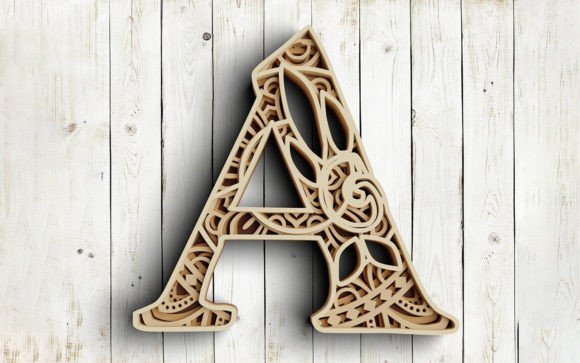
The intersection of typography and botanical art creates a unique visual appeal that resonates with modern crafters and design enthusiasts. A Layered Floral Alphabet Letter A is not merely a font choice; it is a complex, multi-dimensional design asset that blends the structural integrity of an alphabet character with the organic intricacy of a 3D Mandala theme. For creators using cutting machines like Cricut or Silhouette, or those utilizing laser cutters for wood and acrylic projects, understanding the nuances of these layered files is essential. Many beginners rush into purchasing or downloading these assets without fully grasping the technical requirements, leading to wasted materials and frustrated efforts. This guide aims to clarify the process, helping you avoid common pitfalls and achieve professional-quality results.
Understanding the Complexity of 4-Layer 3D Designs
When you encounter a design labeled as a "4-layer 3D design," it implies a specific construction method. Unlike a standard flat SVG, this Layered Mandala SVG requires precise assembly. Each layer represents a different depth or color zone, creating a shadow box effect when stacked. The blend of the alphabet and the mandala theme means that negative space is just as important as the positive space. A common misunderstanding is assuming that all layers are identical in size or shape. In reality, each layer often varies slightly to create the illusion of depth and perspective.
Many hobbyists overlook the importance of layer registration. If the layers are not aligned perfectly during assembly, the intricate floral details can look misaligned or messy. This is particularly true for the letter "A," which has a triangular structure that requires careful balancing of the mandala elements within its legs and crossbar. Before you begin cutting, take time to study the digital preview. Understand how each layer interacts with the others. This pre-visualization step is crucial for avoiding errors during the physical assembly phase.
File Format Misconceptions and Compatibility Issues
One of the most frequent mistakes involves selecting the wrong file format for your specific machine or software. The zip file associated with a high-quality Layered Floral Alphabet Letter A typically includes SVG, DXF, EPS, and PNG formats. However, using the wrong one can lead to significant issues.
- SVG for Cricut Design Space: This is the preferred format for Cricut users. It retains vector data, allowing for infinite scaling without loss of quality. Ensure your software is updated to handle complex paths, as mandala designs can have thousands of anchor points.
- SVG for Silhouette Studio Designer: Silhouette users must ensure they have the Designer Edition or higher to import SVGs natively. Basic users may struggle with compatibility, leading to distorted shapes or missing nodes.
- DXF for Laser Cutting: DXF files are often preferred for industrial laser cutters because they are lightweight and universally accepted by CAD software. Using an SVG for a laser cutter might require conversion, which can introduce errors in the cut paths.
- EPS for Laser Printing and Vector Editing: If you plan to edit the design in Adobe Illustrator or CorelDRAW before sending it to a printer or cutter, EPS is the robust choice. It preserves layer information and color profiles better than raster formats.
- PNG High Resolution 300 dpi: This is a raster image, suitable for sublimation printing or digital mockups. It cannot be used for cutting unless you use a trace function, which often results in jagged edges and poor detail retention for intricate mandalas.
Failing to match the file type to your workflow can result in poor cut quality, excessive weeding time, or complete project failure. Always verify the software compatibility before starting your project.
Material Selection and Cutting Precision
The beauty of a 3D mandala alphabet lies in its delicacy. However, this delicacy demands precise material selection. A common error is using cardstock that is too thick or too brittle. Thick cardstock may not bend easily around the curves of the floral elements, causing cracks or white stress marks. Conversely, paper that is too thin may tear during the weeding process, especially in the small, intricate sections of the mandala.
For best results, use high-quality, flexible cardstock or specialty papers designed for layering. When using a laser cutter, the choice between wood, acrylic, or cardboard affects the kerf (the width of the cut). You must account for this in your design settings to ensure the layers fit together snugly. If the fit is too loose, the 3D effect collapses; if too tight, the pieces may warp or break during assembly.
Additionally, consider the adhesive. Standard glue sticks can cause paper to warp due to moisture. Spray adhesives or double-sided tape sheets are often better choices for maintaining the flatness and alignment of each layer. Apply adhesive sparingly and precisely to avoid oozing, which can ruin the visual clarity of the floral details.
Assembly Techniques for a Professional Finish
Even with perfect cuts, poor assembly can ruin a Layered Floral Alphabet Letter A. Many creators attempt to glue all layers at once, leading to misalignment. The correct approach is to assemble the project in stages. Start with the base layer and add subsequent layers one by one, checking alignment after each addition. Use tweezers for handling small floral pieces and a bone folder to press down edges firmly without damaging the paper.
Lighting also plays a role in the final presentation. Since this is a 3D design, shadows are integral to its aesthetic. Consider placing the finished piece in a shadow box frame with adequate depth. This not only protects the delicate layers but also enhances the 3D effect by allowing light to cast natural shadows between the layers. For a gift, this presentation elevates the perceived value and craftsmanship of the item.
Evaluating Quality Before Purchase or Download
Before committing to a design, evaluate the source and the file details. Look for previews that show each layer separately. This transparency allows you to assess the complexity and decide if it matches your skill level. Check if the seller provides support or tutorials for assembly. A reputable provider will offer clear instructions and possibly video guides.
Ensure the download includes all necessary formats. A complete package should offer SVG, DXF, EPS, and PNG files, as described in the product details. Missing formats can limit your versatility and force you to convert files, which risks quality degradation. Also, verify the resolution of the PNG files; 300 dpi is the standard for high-quality printing. Lower resolutions will appear pixelated and unprofessional.
Finally, consider the intended use. Is this for personal home decor, a commercial product, or a gift? Ensure the license terms allow for your intended usage. Some designers restrict commercial use, while others offer extended licenses. Respecting intellectual property rights is crucial for ethical crafting and business practices.
By paying attention to these details—file compatibility, material selection, assembly technique, and quality evaluation—you can transform a simple digital file into a stunning physical artifact. The Layered Floral Alphabet Letter A offers a rewarding challenge for crafters willing to invest time in precision and care. Avoid the shortcuts that lead to disappointment, and embrace the meticulous process that yields beautiful, professional results.